
And now, time for a TWAV by our friend and CEO Jason Measures!
You've been waiting too long. We've been working hard. Shifts is finally here!
When we launched late November of 2022, we set out to change the way people experience work in the restaurant. Restaurant life is hard and we're here to make it easier for you. We needed to get the product in your hands to learn from you so we could get the product where it needs to be. We heard you and have been grinding for months to help make running shifts simpler and smoother. We believe this is a huge step forward, but we won't stop listening. Keep telling us how to improve. We're incredibly grateful for you all. It's an honor and privilege to be fighting in the trenches with you.
Alright, let's dive in.
Shifts - Everything in one place
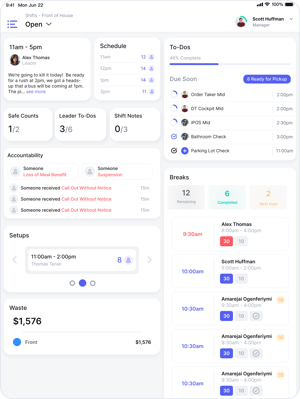
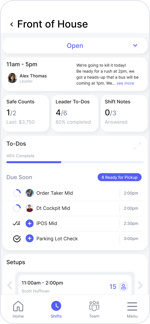
Let's simplify things...
Everything that needs to get done for a Shift is now in one view. Instead of manually assigning Checklists & Tasks, they just show up everyday. VSBL knows what setups you should build for the day so you don't have to remember. When's that next person coming in? Just tap the schedule.
Hey Shift Leaders, you're the bomb.com! Hopefully this helps.
It's not easy leading a Shift. We've spent many years doing it ourselves (that is why we built VSBL, in case you didn't know). Because Setups are now built as templates on Shifts, you'll receive a to-do on your home screen to build the setups for your shift. No more rummaging around Playbook to find the right play; instead VSBL delivers them to you. Oh, and you have the ability to make Custom Shift Notes Questions now, instead of just one long text box.
Due Times, Start Times, and Weekly To-Dos
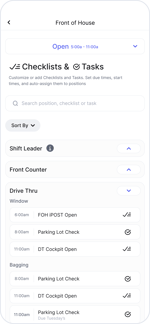
Checklists & Tasks now have due times so you can ensure things are completed when they should be. Set start times to ensure people don't start working on their checklist before they get to their position (even though we love that enthusiasm!). You asked for weekly to-dos, and they're finally here. Have a cleaning checklist that should only be completed Saturdays? Just set the checklist frequency to Weekly-Saturday and it'll only be assigned on Saturdays.
"Can we do more on Tablet?" We got you.ƒ
You asked for more functionality on tablet... so here it is. Everything for your Shift is accessible on any tablet in the restaurant. From Checklists & Tasks, Setups, Schedule, Accountability and more - it's all there. Using employee PINs, the Shifts Hub only shows employees what they're allowed to see based on their Role & Permissions.
Swap Restaurants & Change Language on Tablet
Now you can swap which restaurant you're viewing on tablet, as well as change language to Spanish.
Setups Reimagined
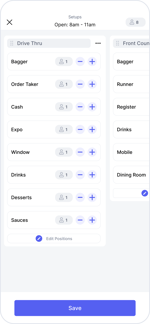
You wanted more, so we completely reimagined Setups with a new design.
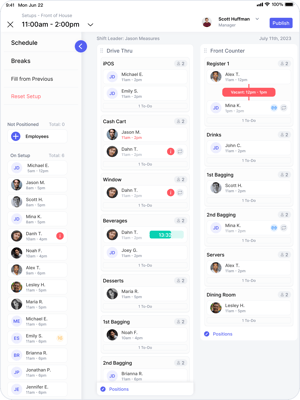
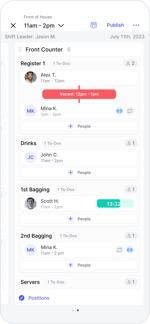
Introducing Groups
Groups allow you to collect positions in one container, making it easier to identify where positions & people are for each Setup. Groups are your own, so you can format your setups however you'd like. In our test restaurants, most have used Drive Thru, Front Counter and Leadership as groups for Front of House.
It's Good to Have Buddies
That's why we added it in Setups. You can now buddy 2 people together and attach notes from within the Setup, so employees will see who they're paired with right from their Home. We're hopeful this will help with position rotations and will expand this feature in the future.
A Better Setup Roster
We've increased the reliability of our scheduling data API's and how the Roster generates. The aim is to improve Setup Roster reliability.
Create Setups on Tablet (And desktop soon!)
On launch in October, you will be able to create setups from any tablet device. We're also working hard to bring it to our website and expect it to be included shortly after Shifts releases. Of course, you'll still be able to make Setups on mobile.
Fill From a Previous Setup
You'll now be able to copy everyone's position from the previous setup to speed up the setup building process. VSBL will ask if you'd like to fill from the previous setup when you first create one, as long as there's a setup beforehand.
"Who's been on a position multiple times today?" The repeat tag has you covered: 
While building a setup, you'll see the repeat tag appear next to an employee if they've already been placed in that position. Tap on the employee to see how many times they've been there for the day.
Home is Where The Heart is
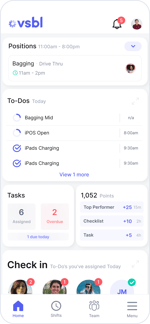
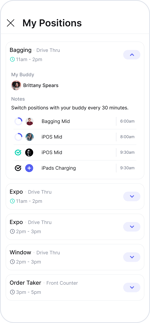
Position Tile Makeover (psssst, it's easier to help your teammates)
Setups have undergone a fabulous makeover, and we couldn't help but give some tender loving care to the Position Tile as well. The Position Tile now displays your current position, your buddy, and any notes left by leadership just for you. When you open the position tile, you'll have a quick view of all the To-Dos assigned to your position, making it super easy to lend a helping hand to your fellow teammates!
Today Tile is now To-Dos
We didn't change how it works, but it made more sense to call it To-Dos. We also changed the design up a bit to provide the new functionality introduced with Shifts. Everything you're assigned for the day will still be there, just with due times now!
Check In Tile won't be as annoying
Sometimes when you assign a bunch of To-Dos, Check In would become extremely large showing profile pictures for everyone. I don't know about you, I love seeing those pictures, but it got annoying... so we've limited it to show only 4 profile pictures at a time. If you've assigned To-Dos to more than 4 people, it now says "View 3 more" at the bottom of the tile.
Goodbye Playbook, Hello Templates for Setups
You told us that Playbook was confusing and unintuitive, we agree. So we removed it and simplified the experience. Now, you'll create Templates for each setup. You can edit these at any time, choosing which positions belong in different setups, recommended staffing numbers, as well as create different templates for specific weekdays. These setups automatically appear for the Shift Leader on their Home, and on the Shift.
Checklists & Tasks for the Shift (Available on Desktop)
Checklists & Tasks no longer attach to the Setup/Playbook, instead you'll list out everything that needs to be completed on the shift itself. This should help to simplify the experience of onboarding & adjusting your day-to-day operations. Checklists & Tasks will automatically assign to employees based on their position within the setup.
Safe Counts Got a Makeover
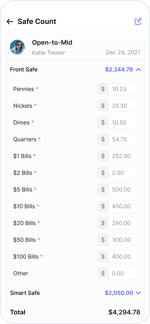
I don't know about you, but the current Safe Counts design feels a little.... dated & unintuitive. So it's been redesigned to work top-to-bottom by currency denomination. We plan to make Safe Counts customizable in the future, so you can build out exactly how your team does Safe Counts.
Start preparing for the release of Shifts in September now! In the app, just tap on the new Shifts tab at the bottom. There's a process that will guide you through getting it all put together. (You must have the "Manage Shifts" permission)
Check out this video from our CEO for help creating your Shifts!